 Call Now
ITR 3 – What is ITR 3 Form & How to File ITR-3?
This page contains information on filing ITR-3 for FY 2021-22 (AY 2022-23), FY 2020-21 (AY 2021-22), and FY 2019-20 (AY 2020-21)
.png)
What is the ITR-3 Form?
The ITR-3 is applicable for individual and HUF who have income from profits and gains from business or profession. The persons having income from following sources are eligible to file ITR-3 :
Who can file ITR-3 Form?
- Carrying on a business or profession (both tax audit and non-audit cases)
- The return may include income from house property, salary/pension, capital gains and income from other sources.
Note:
- The due date for filing ITR-3 in case of a taxpayer subject to tax audit has been extended to 15th February 2022 from 31st October 2021 for the AY 2021-22 (FY 2020-21). The due date for furnishing tax audit report is extended to 15th January 2022.
- The threshold limit of Rs 1 crore for a tax audit is proposed to be increased to Rs 5 crore with effect from AY 2020-21 (FY 2019-20) if the taxpayer’s cash receipts are limited to 5% of the gross receipts or turnover, and if the taxpayer’s cash payments are limited to 5% of the aggregate payments.
How to File ITR-3? – Steps to e-File Your ITR-3
ITR e-Filing – Login & Required Documents
You can file your income tax return (ITR) on the ClearTax platform. Here is a guide on filing ITR-3 if you have income from business or profession, intra-day trading or Futures and Options (F&O) trading. Before we get started, you should have the following documents at hand to pace up the process:
- PAN
- Aadhaar
- Bank account details
- Form 16 if applicable
- Investments details
- Books of accounts

Login
Login to your ClearTax account (www.cleartax.in). You can file ITR yourself in a few simple steps. To begin ITR filing, click on the ‘Start Filing’ link.

Link Your PAN
Step 3: Clear (previously ClearTax) allows you to access data from the income tax department and pre-fill information for preparing an income tax return. Link your PAN by entering ‘PAN Card Number’ and ‘Date of Birth’.

The linking shall complete when you do an OTP verification. You can verify OTP by selecting ‘Aadhaar registered mobile number’ or ‘IT Department registered mobile number’.

Pre-fill Your Personal Information
To allow us to pre-fill your information from the income tax department, complete another OTP verification. This OTP verification is to capture all your personal information and income details in your income tax return with maximum security of your data.

Opting for this saves you a lot of time and hassle with manual entries. We’ve made painstaking efforts to help you file the return in under 3 minutes. So proceed to do an OTP verification.

After OTP verification, the personal information and income details will be imported from the income tax department.
On the next page, you can preview all your details pre-filled. All you have to do is ensure that they are correct.

Edit and Review Details
Personal Information
Go to the ‘Personal Info’ tab and check the pre-filled details. If you want to add or edit any information, you can make the changes and proceed.

Income Sources
Go to the ‘Income Sources’ tab. Here, your salary details are also pre-filled. Just review the details whether they are correct and edit if required. If you did not select the pre-fill option earlier, you could upload your Form 16 or 26AS PDF to fetch the salary details. Next, you can enter details of rental income or income from house property, other income, and capital gain
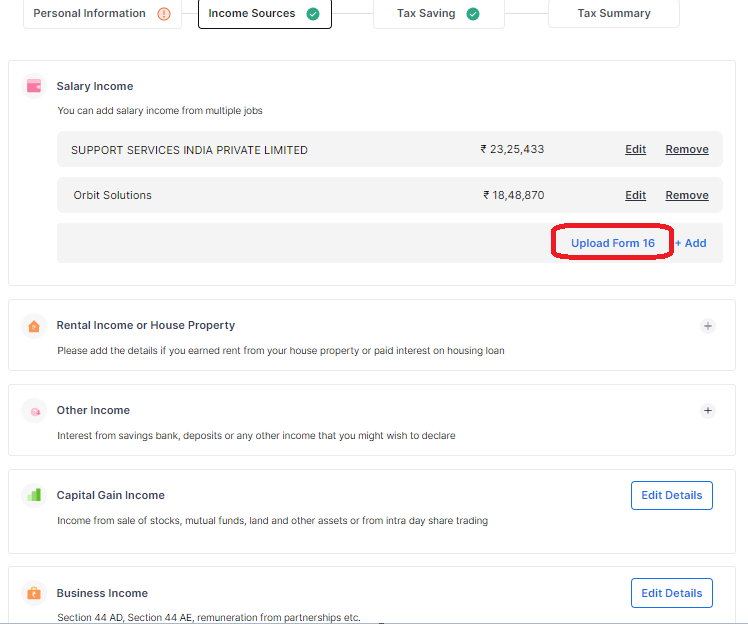
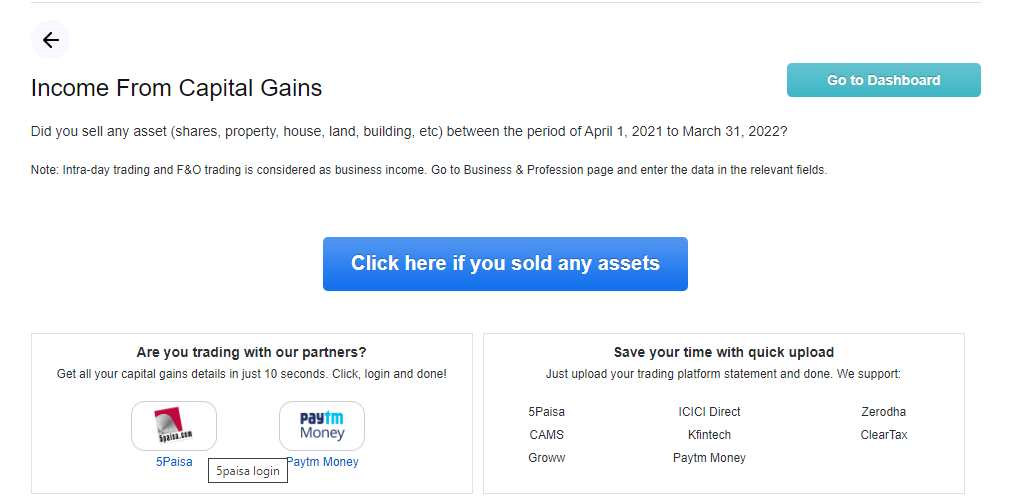
ClearTax has partnered with various brokerage firms to capture the capital gains from shares and mutual-fund-related transactions automatically. We support importing capital gains data directly from platforms like 5paisa and Paytm Money.
In the capital gains section, click on the relevant platforms
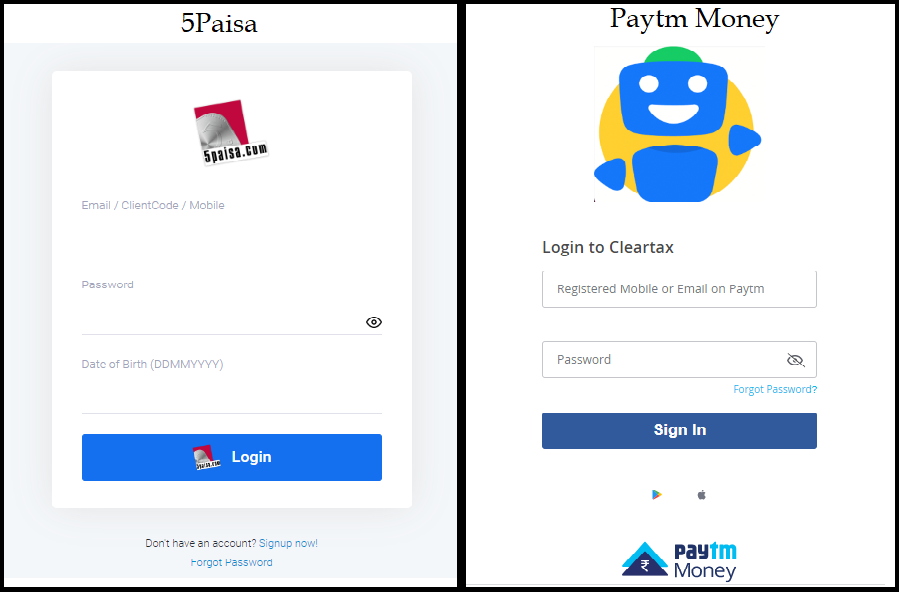
You will be redirected to a new tab where you can log in to your broker’s account, and after successful login, all your capital gains details will be fetched automatically.
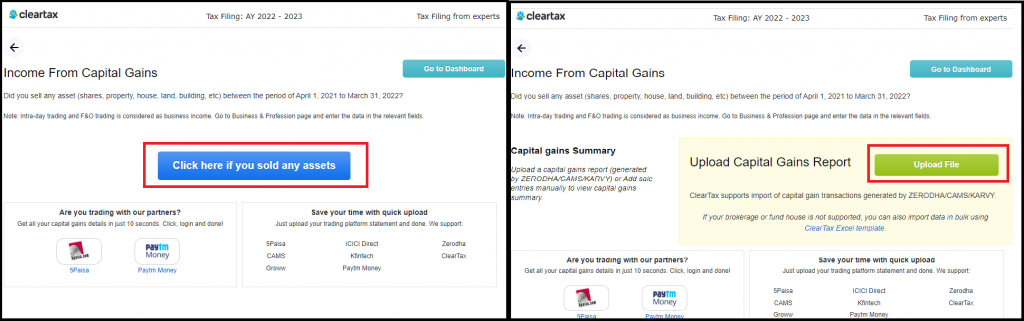
If you are registered with other brokers then click on the button ‘Click here if you sold any assets’. Now, upload the capital gains report. To know how to extract them, click on ‘upload file’ and on the right, you can see the guides on how to download the report on all these platforms. Upload it and all your capital gains from shares and mutual funds are captured automatically.
Profit from Business or Profession
Now, enter the business income tab. Here, you will need to click ‘Add BSPL Income
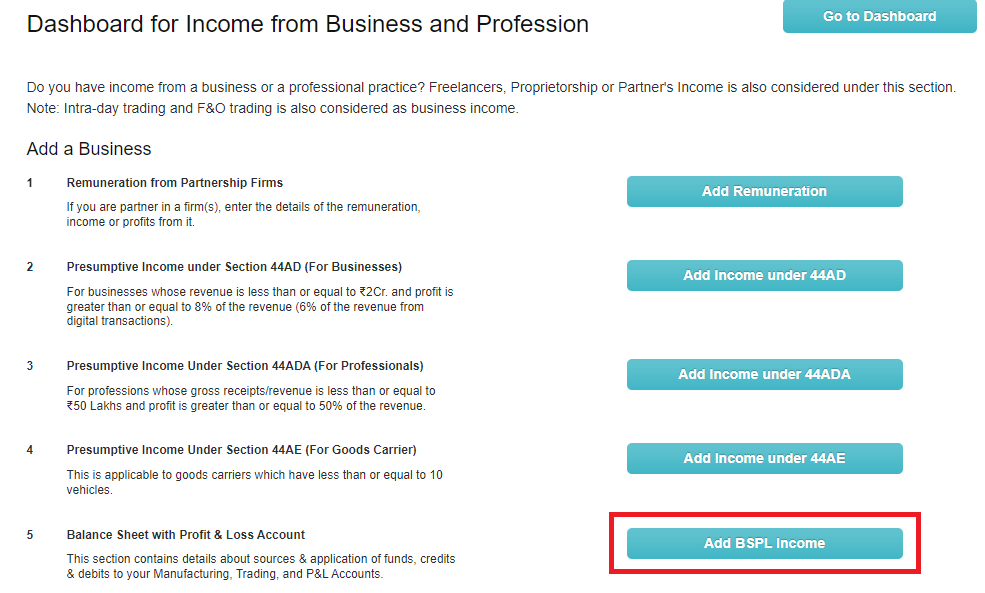
Here, fill in the Balance sheet, P&L, depreciation, ICDS and other details if they are applicable.

Go back to the dashboard. In the ‘speculative income’ section, enter details of your income from speculative transactions like intra-day trading, etc. .
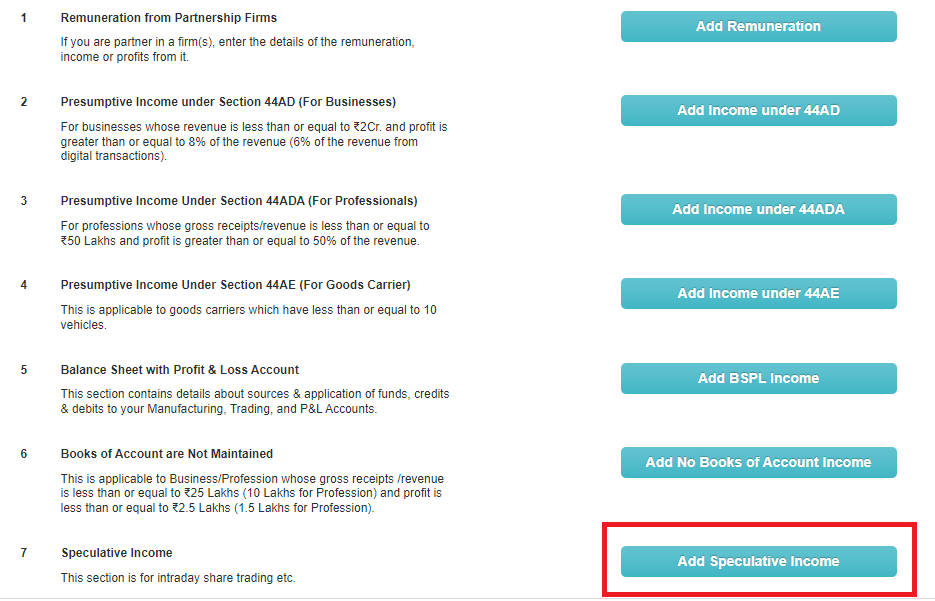
Once done, scroll down to fill in the income computation in Schedule BP and fill up the Schedule OI. Next, add your auditor details if tax audit is applicable to you. Then click on ‘Go to next’ to proceed to enter tax-saving details.

Under the ‘Deductions’ tab, review the investment details (say LIC, PPF, etc.) captured. If you want to add more tax-saving details, you can edit the fields and claim tax benefits here.
Watch out for the tax-saving tips that are prompted to you on the screen.
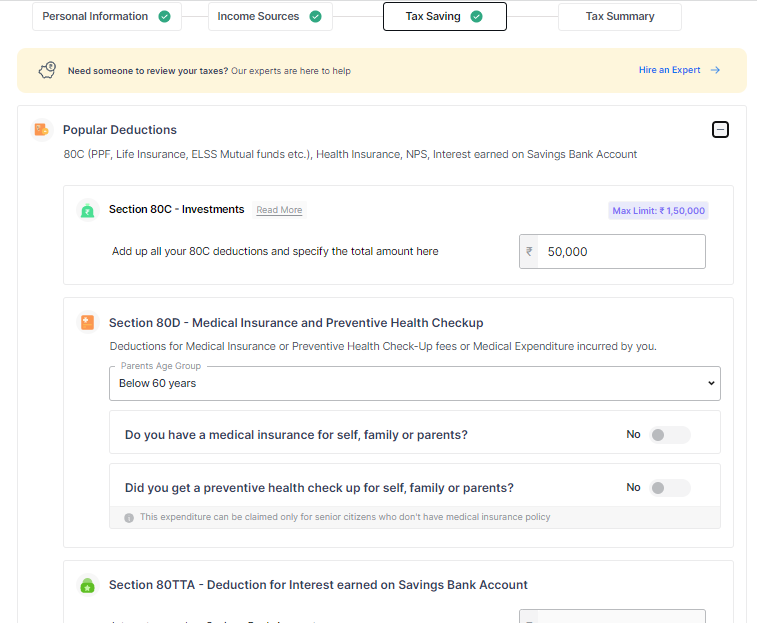
Tip: Do you have kids? Claim benefits on their tuition fees under Section 80C.
Also, interests up to Rs 10,000 earned on your savings account maintained with a bank, post office, or co-operative society can be claimed as a deduction under 80TTA.
Enter the Tax Paid Details
If you scroll down below, you can enter taxes-paid details. Add tax payments already made if you have any non-salary income, say, interest or freelance income.
You can also add these details by uploading Form 26AS. In the case of uploading Form 26AS, only the TDS details get auto-populated and not the income, hence required to enter the income details in the respective place.
You can claim relief under Section 89 of the Income Tax Act. Also, enter the self-assessment tax paid for the relevant financial year under the tab ‘Self tax payments’.

Schedule AL and Other Disclosures
Now, if any of the conditions mentioned in the ‘Other Disclosures’ section apply to you, fill in those relevant sections.
Say your total income after deductions exceed Rs 50 lakh, you must fill in the schedule AL. Here, fill in details of all your assets and liabilities if they were not included in the balance sheet earlier. If you are a non‐resident or ‘resident but not ordinarily resident’, only the details of assets located in India are to be mentioned.
Likewise, in the current account deposits section, you will have to add the total amount deposited if you have deposited more than ₹1 crore in FY 21-22

View Summary, Compare, and Switch Tax Regimes
On the next page, you can also view the computation of your income tax. It will compare your tax under both old and new tax regimes.
The ClearTax portal allows you to switch the tax regime at this stage. You can also view and download your tax report.
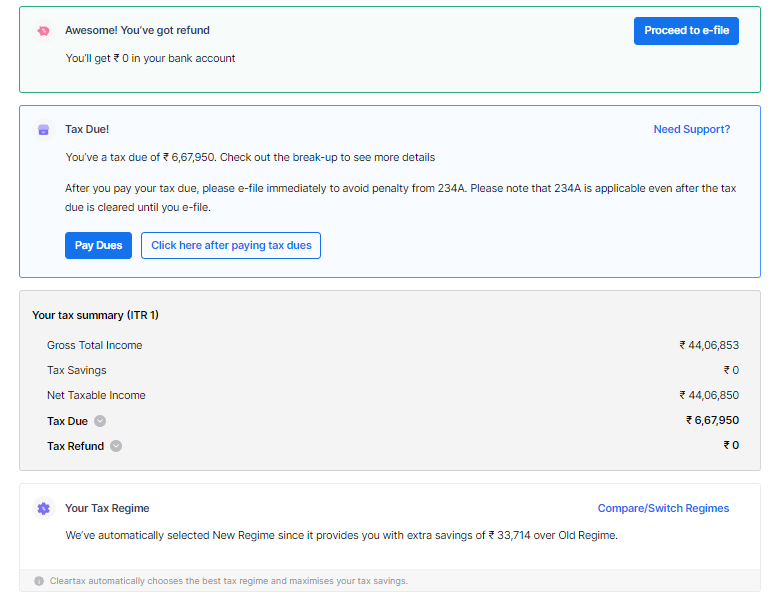
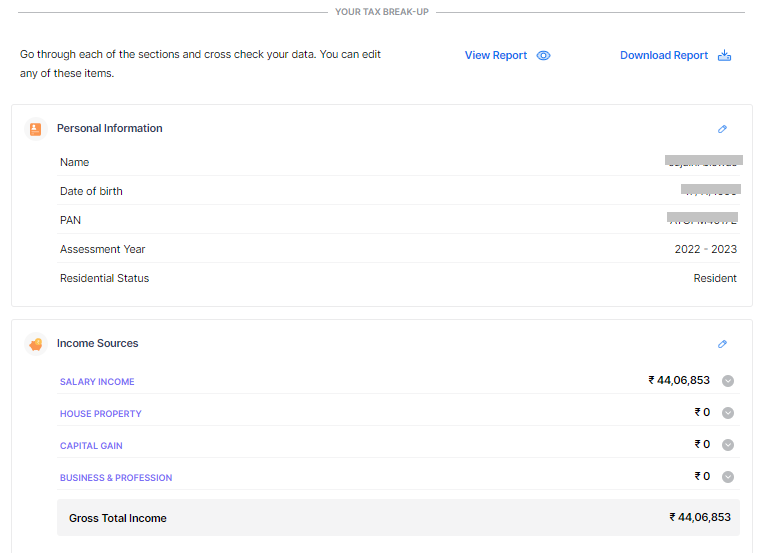
Scroll down below, and you can go through all the details filled by you in each section and edit any of these items. To proceed, click on ‘File tax’.

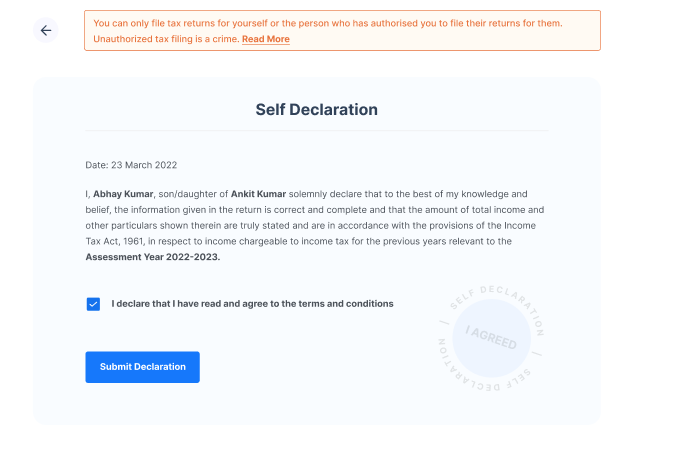
Self-Declaration
You will need to declare that all the information in return, including the amounts, is correct. This step ensures that you have double-checked the information for its correctness and authorised ClearTax to file ITR on your behalf. To proceed, check the box and ‘Submit Declaration’.
Pay Taxes
You can view your tax due status in the computation. If any tax is due to be paid, you must pay the same and enter the challan details to proceed to e-file. Read this guide to know how to pay your tax dues.
If you see ‘Refund’ or ‘No Tax Due’ here, you can proceed to e-file. You will get an acknowledgement number on the next screen.
Make Payment
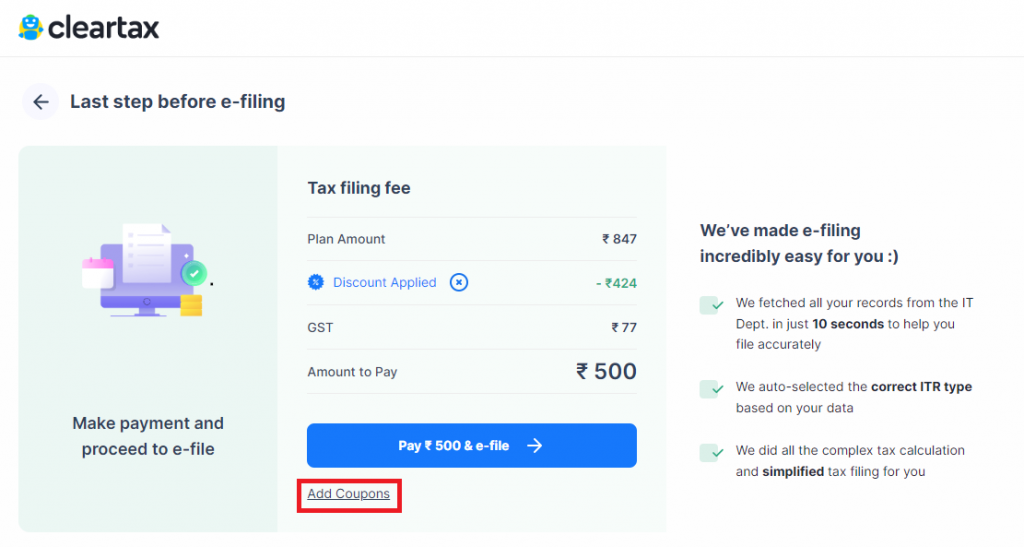
You can now make the payment for submitting your return through the Clear (previously ClearTax) portal. To do the same, click on ‘Proceed to e-File’.
On completion, you will see a success message as shown below.

ITR Submitted Successfully
If the ITR is successfully submitted to the income tax department, you can see the success message below.

e-Verify
Once your return is filed, e-verify your income tax return.
Important: Uploading ITR alone does not complete the return filing process. Verification of return is important to complete the return filing process.
What is the structure of the ITR 3 Form for AY 2022-23?
ITR-3 is divided into:
- Part A
- Part A-GEN: General information and Nature of Business
- Part A-BS: Balance Sheet as of March 31, 2021, of the Proprietary Business or Profession
- Part A- Manufacturing Account: Manufacturing Account for the financial year 2020-21
- Part A- Trading Account: Trading Account for the financial year 2020-21
- Part A-P&L: Profit and Loss for the financial Year 2020-21
- Part A-OI: Other Information (optional in a case not liable for audit under Section 44AB)
- Part A-QD: Quantitative Details (optional in a case not liable for audit under Section 44AB)
After this, there are the following schedules.
- Schedule-S: Computation of income under the head Salaries.
- Schedule-HP: Computation of income under the head Income from House Property
- Schedule BP: Computation of income from business or profession
- Schedule-DPM: Computation of depreciation on plant and machinery under the Income-tax Act
- Schedule DOA: Computation of depreciation on other assets under the Income-tax Act
- Schedule DEP: Summary of depreciation on all the assets under the Income-tax Act
- Schedule DCG: Computation of deemed capital gains on the sale of depreciable assets
- Schedule ESR: Deduction under section 35 (expenditure on scientific research)
- Schedule-CG: Computation of income under the head Capital gains.
- Schedule 112A: Details of Capital Gains where section 112A is applicable
- Schedule 115AD(1)(b)(iii)Proviso: For Non-Residents Details of Capital Gains where section 112A is applicable
- Schedule-OS: Computation of income under the head Income from other sources.
- Schedule-CYLA-BFLA: Statement of income after set off of current year’s losses and Statement of income after set off of unabsorbed loss brought forward from earlier years.
- Schedule-CYLA: Statement of income after set off of current year’s losses
- Schedule BFLA: Statement of income after set off of unabsorbed loss brought forward from earlier years.
- Schedule CFL: Statement of losses to be carried forward to future years.
- Schedule- UD: Statement of unabsorbed depreciation.
- Schedule ICDS – Effect of Income Computation Disclosure Standards on Profit
- Schedule- 10AA: Computation of deduction under section 10AA.
- Schedule 80G: Statement of donations entitled for deduction under section 80G.
- Schedule RA: Statement of donations to research associations etc. entitled for deduction under section 35(1)(ii) or 35(1)(iia) or 35(1)(iii) or 35(2AA)
- Schedule- 80IA: Computation of deduction under section 80IA.
- Schedule- 80IB: Computation of deduction under section 80IB.
- Schedule- 80IC/ 80-IE: Computation of deduction under section 80IC/ 80-IE.
- Schedule VI-A: Statement of deductions (from total income) under Chapter VIA.
- Schedule AMT: Computation of Alternate Minimum Tax Payable under Section 115JC
- Schedule AMTC: Computation of tax credit under section 115JD
- Schedule SPI: Statement of income arising to spouse/ minor child/ son’s wife or any other person or association of persons to be included in the income of the assessee in Schedules-HP, BP, CG and OS.
- Schedule SI: Statement of income which is chargeable to tax at special rates
- Schedule-IF: Information regarding partnership firms in which assessee is a partner.
- Schedule EI: Statement of Income not included in total income (exempt incomes)
- Schedule PTI: Pass through income details from a business trust or investment fund as per section 115UA, 115UB
- Schedule TPSA: Secondary adjustment to transfer price as per section 92CE(2A)
- Schedule FSI: Details of income from outside India and tax relief
- Schedule TR: Statement of tax relief claimed under section 90 or section 90A or section 91.
- Schedule FA: Statement of Foreign Assets and income from any source outside India.
- Schedule 5A: Information regarding apportionment of income between spouses governed by Portuguese Civil Code
- Schedule AL: Asset and Liability at the end of the year(applicable where the total income exceeds Rs 50 lakhs)
- Schedule GST: Information regarding turnover/ Gross receipt reported for GST
- Part B-TI: Computation of Total Income.
- Part B-TTI: Computation of tax liability on total income.
- Verification
How do I file my ITR-3 Form?
A taxpayer has to compulsorily file ITR-3 online. The ITR-3 can be filed online/electronically:
- By furnishing the return electronically under a digital signature
- By transmitting the data electronically and then submitting the verification of the return in Form ITR-V
If you submit your ITR-3 Form electronically under digital signature, the acknowledgement will be sent to your registered email id. You can also choose to download it manually from the income tax website. You are then required to sign it and send it to the Income Tax Department’s CPC office in Bangalore within 120 days of e-filing. Remember that ITR-3 is an annexure-less form i.e. you do not have to attach any documents when you send it.
How do you send your ITR-V to the CPC Office?
We have a guide to help you print and send your ITR-V to the CPC office.
How to fill out the verification document?
While filling up the data in the income tax return, a taxpayer should also fill up the verification. Please note that any person making a false statement in the return or any of the accompanying schedules shall be liable to be prosecuted under section 277 of the Income-tax Act, 1961 and on conviction be punishable under that section with rigorous imprisonment and with fine.
Business Codes for ITR Forms
| Sector | Sub‐Sector | Code |
|---|---|---|
| AGRICULTURE, ANIMAL HUSBANDRY & FORESTRY | Growing and manufacturing of tea | 1001 |
| Growing and manufacturing of coffee | 1002 | |
| Growing and manufacturing of rubber | 1003 | |
| Market gardening and horticulture specialties | 1004 | |
| Raising of silk worms and production of silk | 1005 | |
| Raising of bees and production of honey | 1006 | |
| Raising of poultry and production of eggs | 1007 | |
| Rearing of sheep and production of wool | 1008 | |
| Rearing of animals and production of animal products | 1009 | |
| Agricultural and animal husbandry services | 1010 | |
| Soil conservation, soil testing and soil desalination services | 1011 | |
| Hunting, trapping and game propagation services | 1012 | |
| Growing of timber, plantation, operation of tree nurseries and conserving of forest | 1013 | |
| Gathering of tendu leaves | 1014 | |
| Gathering of other wild growing materials | 1015 | |
| Forestry service activities, timber cruising, afforestation and reforestation | 1016 | |
| Logging service activities, transport of logs within the forest | 1017 | |
| Other agriculture, animal husbandry or forestry activity n.e.c | 1018 | |
| FISH FARMING | Fishing on commercial basis in inland waters | 2001 |
| Fishing on commercial basis in ocean and coastal areas | 2002 | |
| Fish farming | 2003 | |
| Gathering of marine materials such as natural pearls, sponges, coral etc. | 2004 | |
| Services related to marine and fresh water fisheries, fish hatcheries and fish farms | 2005 | |
| Other Fish farming activity n.e.c | 2006 | |
| MINING AND QUARRYING | Mining and agglomeration of hard coal | 3001 |
| Mining and agglomeration of lignite | 3002 | |
| Extraction and agglomeration of peat | 3003 | |
| Extraction of crude petroleum and natural gas | 3004 | |
| Service activities incidental to oil and gas extraction excluding surveying | 3005 | |
| Mining of uranium and thorium ores | 3006 | |
| Mining of iron ores | 3007 | |
| Mining of non‐ferrous metal ores, except uranium and thorium ores | 3008 | |
| Mining of gemstones | 3009 | |
| Mining of chemical and fertilizer minerals | 3010 | |
| Mining of quarrying of abrasive materials | 3011 | |
| Mining of mica, graphite and asbestos | 3012 | |
| Quarrying of stones (marble/granite/dolomite), sand and clay | 3013 | |
| Other mining and quarrying | 3014 | |
| Mining and production of salt | 3015 | |
| Other mining and quarrying n.e.c | 3016 | |
| MANUFACTURING | Production, processing and preservation of meat and meat products | 4001 |
| Production, processing and preservation of fish and fish products | 4002 | |
| Manufacture of vegetable oil, animal oil and fats | 4003 | |
| Processing of fruits, vegetables and edible nuts | 4004 | |
| Manufacture of dairy products | 4005 | |
| Manufacture of sugar | 4006 | |
| Manufacture of cocoa, chocolates and sugar confectionery | 4007 | |
| Flour milling | 4008 | |
| Rice milling | 4009 | |
| Dal milling | 4010 | |
| Manufacture of other grain mill products | 4011 | |
| Manufacture of bakery products | 4012 | |
| Manufacture of starch products | 4013 | |
| Manufacture of animal feeds | 4014 | |
| Manufacture of other food products | 4015 | |
| Manufacturing of wines | 4016 | |
| Manufacture of beer | 4017 | |
| Manufacture of malt liquors | 4018 | |
| Distilling and blending of spirits, production of ethyl alcohol | 4019 | |
| Manufacture of mineral water | 4020 | |
| Manufacture of soft drinks | 4021 | |
| Manufacture of other non‐alcoholic beverages | 4022 | |
| Manufacture of tobacco products | 4023 | |
| Manufacture of textiles (other than by handloom) | 4024 | |
| Manufacture of textiles using handlooms (khadi) | 4025 | |
| Manufacture of carpet, rugs, blankets, shawls etc. (other than by hand) | 4026 | |
| Manufacture of carpet, rugs, blankets, shawls etc. by hand | 4027 | |
| Manufacture of wearing apparel | 4028 | |
| Tanning and dressing of leather | 4029 | |
| Manufacture of luggage, handbags and the like saddler and harness | 4030 | |
| Manufacture of footwear | 4031 | |
| Manufacture of wood and wood products, cork, straw and plaiting material | 4032 | |
| Manufacture of paper and paper products | 4033 | |
| Publishing, printing and reproduction of recorded media | 4034 | |
| Manufacture of coke oven products | 4035 | |
| Manufacture of refined petroleum products | 4036 | |
| Processing of nuclear fuel | 4037 | |
| Manufacture of fertilizers and nitrogen compounds | 4038 | |
| Manufacture of plastics in primary forms and | 4039 | |
| of synthetic rubber | ||
| Manufacture of paints, varnishes and similar coatings | 4040 | |
| Manufacture of pharmaceuticals, medicinal chemicals and botanical products | 4041 | |
| Manufacture of soap and detergents | 4042 | |
| Manufacture of other chemical products | 4043 | |
| Manufacture of man‐made fibers | 4044 | |
| Manufacture of rubber products | 4045 | |
| Manufacture of plastic products | 4046 | |
| Manufacture of glass and glass products | 4047 | |
| Manufacture of cement, lime and plaster | 4048 | |
| Manufacture of articles of concrete, cement and plaster | 4049 | |
| Manufacture of Bricks | 4050 | |
| Manufacture of other clay and ceramic products | 4051 | |
| Manufacture of other non‐metallic mineral products | 4052 | |
| Manufacture of pig iron, sponge iron, Direct Reduced Iron etc. | 4053 | |
| Manufacture of Ferro alloys | 4054 | |
| Manufacture of Ingots, billets, blooms and slabs etc. | 4055 | |
| Manufacture of steel products | 4056 | |
| Manufacture of basic precious and non‐ ferrous metals | 4057 | |
| Manufacture of non‐metallic mineral products | 4058 | |
| Casting of metals | 4059 | |
| Manufacture of fabricated metal products | 4060 | |
| Manufacture of engines and turbines | 4061 | |
| Manufacture of pumps and compressors | 4062 | |
| Manufacture of bearings and gears | 4063 | |
| Manufacture of ovens and furnaces | 4064 | |
| Manufacture of lifting and handling equipment | 4065 | |
| Manufacture of other general‐purpose machinery | 4066 | |
| Manufacture of agricultural and forestry machinery | 4067 | |
| Manufacture of Machine Tools | 4068 | |
| Manufacture of machinery for metallurgy | 4069 | |
| Manufacture of machinery for mining, quarrying and constructions | 4070 | |
| Manufacture of machinery for processing of food and beverages | 4071 | |
| Manufacture of machinery for leather and textile | 4072 | |
| Manufacture of weapons and ammunition | 4073 | |
| Manufacture of other special purpose machinery | 4074 | |
| Manufacture of domestic appliances | 4075 | |
| Manufacture of office, accounting and computing machinery | 4076 | |
| Manufacture of electrical machinery and apparatus | 4077 | |
| Manufacture of Radio, Television, communication equipment and apparatus | 4078 | |
| Manufacture of medical and surgical equipment | 4079 | |
| Manufacture of industrial process control equipment | 4080 | |
| Manufacture of instruments and appliances for measurements and navigation | 4081 | |
| Manufacture of optical instruments | 4082 | |
| Manufacture of watches and clocks | 4083 | |
| Manufacture of motor vehicles | 4084 | |
| Manufacture of body of motor vehicles | 4085 | |
| Manufacture of parts & accessories of motor vehicles & engines | 4086 | |
| Building & repair of ships and boats | 4087 | |
| Manufacture of railway locomotive and rolling stocks | 4088 | |
| Manufacture of aircraft and spacecraft | 4089 | |
| Manufacture of bicycles | 4090 | |
| Manufacture of other transport equipment | 4091 | |
| Manufacture of furniture | 4092 | |
| Manufacture of Jewellery | 4093 | |
| Manufacture of sports goods | 4094 | |
| Manufacture of musical instruments | 4095 | |
| Manufacture of games and toys | 4096 | |
| Other manufacturing n.e.c | 4097 | |
| Recycling of metal waste and scrap | 4098 | |
| Recycling of non‐ metal waste and scrap | 4099 | |
| ELECTRITY, GAS AND WATER | Production, collection and distribution of electricity | 5001 |
| Manufacture and distribution of gas | 5002 | |
| Collection, purification and distribution of water | 5003 | |
| Other essential commodity service n.e.c | 5004 | |
| CONSTRUCTION | Site preparation works | 6001 |
| Building of complete constructions or parts‐ civil contractors | 6002 | |
| Building installation | 6003 | |
| Building completion | 6004 | |
| Construction and maintenance of roads, rails, | 6005 | |
| bridges, tunnels, ports, harbor, runways etc. | ||
| Construction and maintenance of power plants | 6006 | |
| Construction and maintenance of industrial plants | 6007 | |
| Construction and maintenance of power transmission and telecommunication lines | 6008 | |
| Construction of water ways and water reservoirs | 6009 | |
| Other construction activity n.e.c | 6010 | |
| REAL ESTATE AND RENTING SERVICES | Purchase, sale and letting of leased buildings (residential and non‐residential) | 7001 |
| Operating of real estate of self‐owned buildings (residential and non‐residential) | 7002 | |
| Developing and sub‐dividing real estate into lots | 7003 | |
| Real estate activities on a fee or contract basis | 7004 | |
| Other real estate/renting services n.e.c | 7005 | |
| RENTING OF MACHINERY | Renting of land transport equipment | 8001 |
| Renting of water transport equipment | 8002 | |
| Renting of air transport equipment | 8003 | |
| Renting of agricultural machinery and equipment | 8004 | |
| Renting of construction and civil engineering machinery | 8005 | |
| Renting of office machinery and equipment | 8006 | |
| Renting of other machinery and equipment n.e.c | 8007 | |
| Renting of personal and household goods n.e.c | 8008 | |
| Renting of other machinery n.e.c | 8009 | |
| WHOLESALE AND RETAIL TRADE | Wholesale and retail sale of motor vehicles | 9001 |
| Repair and maintenance of motor vehicles | 9002 | |
| Sale of motor parts and accessories‐ wholesale and retail | 9003 | |
| Retail sale of automotive fuel | 9004 | |
| General commission agents, commodity brokers and auctioneers | 9005 | |
| Wholesale of agricultural raw material | 9006 | |
| Wholesale of food & beverages and tobacco | 9007 | |
| Wholesale of household goods | 9008 | |
| Wholesale of metals and metal ores | 9009 | |
| Wholesale of household goods | 9010 | |
| Wholesale of construction material | 9011 | |
| Wholesale of hardware and sanitary fittings | 9012 | |
| Wholesale of cotton and jute | 9013 | |
| Wholesale of raw wool and raw silk | 9014 | |
| Wholesale of other textile fibres | 9015 | |
| Wholesale of industrial chemicals | 9016 | |
| Wholesale of fertilizers and pesticides | 9017 | |
| Wholesale of electronic parts & equipment | 9018 | |
| Wholesale of other machinery, equipment and supplies | 9019 | |
| Wholesale of waste, scrap & materials for re‐ cycling | 9020 | |
| Retail sale of food, beverages and tobacco in specialized stores | 9021 | |
| Retail sale of other goods in specialized stores | 9022 | |
| Retail sale in non‐specialized stores | 9023 | |
| Retail sale of textiles, apparel, footwear, leather goods | 9024 | |
| Retail sale of other household appliances | 9025 | |
| Retail sale of hardware, paint and glass | 9026 | |
| Wholesale of other products n.e.c | 9027 | |
| Retail sale of other products n.e.c | 9028 | |
| HOTELS, RESTAURANTS AND HOSPITALITY SERVICES | Hotels – Star rated | 10001 |
| Hotels – Non‐star rated | 10002 | |
| Motels, Inns and Dharmshalas | 10003 | |
| Guest houses and circuit houses | 10004 | |
| Dormitories and hostels at educational institutions | 10005 | |
| Short stay accommodations n.e.c. | 10006 | |
| Restaurants – with bars | 10007 | |
| Restaurants – without bars | 10008 | |
| Canteens | 10009 | |
| Independent caterers | 10010 | |
| Casinos and other games of chance | 10011 | |
| Other hospitality services n.e.c. | 10012 | |
| TRANSPORT & LOGISTICS SERVICES | Travel agencies and tour operators | 11001 |
| Packers and movers | 11002 | |
| Passenger land transport | 11003 | |
| Air transport | 11004 | |
| Transport by urban/sub‐urban railways | 11005 | |
| Inland water transport | 11006 | |
| Sea and coastal water transport | 11007 | |
| Freight transport by road | 11008 | |
| Freight transport by railways | 11009 | |
| Forwarding of freight | 11010 | |
| Receiving and acceptance of freight | 11011 | |
| Cargo handling | 11012 | |
| Storage and warehousing | 11013 | |
| Transport via pipelines (transport of gases, liquids, slurry and other commodities) | 11014 | |
| Other Transport & Logistics services n.e.c | 11015 | |
| POST AND TELECOMMUNICATION SERVICES | Post and courier activities | 12001 |
| Basic telecom services | 12002 | |
| Value added telecom services | 12003 | |
| Maintenance of telecom network | 12004 | |
| Activities of the cable operators | 12005 | |
| Other Post & Telecommunication services n.e.c | 12006 | |
| FINANCIAL INTERMEDIATION SERVICES | Commercial banks, saving banks and discount houses | 13001 |
| Specialised institutions granting credit | 13002 | |
| Financial leasing | 13003 | |
| Hire‐purchase financing | 13004 | |
| Housing finance activities | 13005 | |
| Commercial loan activities | 13006 | |
| Credit cards | 13007 | |
| Mutual funds | 13008 | |
| Chit fund | 13009 | |
| Investment activities | 13010 | |
| Life insurance | 13011 | |
| Pension funding | 13012 | |
| Non‐life insurance | 13013 | |
| Administration of financial markets | 13014 | |
| Stock brokers, sub‐brokers and related activities | 13015 | |
| Financial advisers, mortgage advisers and brokers | 13016 | |
| Foreign exchange services | 13017 | |
| Other financial intermediation services n.e.c. | 13018 | |
| COMPUTER AND RELATED SERVICES | Software development | 14001 |
| Other software consultancy | 14002 | |
| Data processing | 14003 | |
| Database activities and distribution of electronic content | 14004 | |
| Other IT enabled services | 14005 | |
| BPO services | 14006 | |
| Cyber café | 14007 | |
| Maintenance and repair of office, accounting and computing machinery | 14008 | |
| Computer training and educational institutes | 14009 | |
| Other computation related services n.e.c. | 14010 | |
| RESEARCH AND DEVELOPMENT | Natural sciences and engineering | 15001 |
| Social sciences and humanities | 15002 | |
| Other Research & Development activities n.e.c. | 15003 | |
| PROFESSIONS | Legal profession | 16001 |
| Accounting, book‐keeping and auditing profession | 16002 | |
| Tax consultancy | 16003 | |
| Architectural profession | 16004 | |
| Engineering and technical consultancy | 16005 | |
| Advertising | 16006 | |
| Fashion designing | 16007 | |
| Interior decoration | 16008 | |
| Photography | 16009 | |
| Auctioneers | 16010 | |
| Business brokerage | 16011 | |
| Market research and public opinion polling | 16012 | |
| Business and management consultancy activities | 16013 | |
| Labour recruitment and provision of personnel | 16014 | |
| Investigation and security services | 16015 | |
| Building‐cleaning and industrial cleaning activities | 16016 | |
| Packaging activities | 16017 | |
| Secretarial activities | 16018 | |
| Medical Profession | 16019_1 | |
| Film Artist | 16020 | |
| Other professional services n.e.c. | 16019 | |
| EDUCATION SERVICES | Primary education | 17001 |
| Secondary/ senior secondary education | 17002 | |
| Technical and vocational secondary/ senior secondary education | 17003 | |
| Higher education | 17004 | |
| Education by correspondence | 17005 | |
| Coaching centres and tuitions | 17006 | |
| Other education services n.e.c. | 17007 | |
| HEALTH CARE SERVICES | General hospitals | 18001 |
| Speciality and super speciality hospitals | 18002 | |
| Nursing homes | 18003 | |
| Diagnostic centres | 18004 | |
| Pathological laboratories | 18005 | |
| Independent blood banks | 18006 | |
| Medical transcription | 18007 | |
| Independent ambulance services | 18008 | |
| Medical suppliers, agencies and stores | 18009 | |
| Medical clinics | 18010 | |
| Dental practice | 18011 | |
| Ayurveda practice | 18012 | |
| Unani practice | 18013 | |
| Homeopathy practice | 18014 | |
| Nurses, physiotherapists or other para‐ medical practitioners | 18015 | |
| Veterinary hospitals and practice | 18016 | |
| Medical education | 18017 | |
| Medical research | 18018 | |
| Practice of other alternative medicine | 18019 | |
| Other healthcare services | 18020 | |
| SOCIAL AND COMMUNITY WORK | Social work activities with accommodation (orphanages and old age homes) | 19001 |
| Social work activities without accommodation (Creches) | 19002 | |
| Industry associations, chambers of commerce | 19003 | |
| Professional organisations | 19004 | |
| Trade unions | 19005 | |
| Religious organizations | 19006 | |
| Political organisations | 19007 | |
| Other membership organisations n.e.c. (rotary clubs, book clubs and philatelic clubs) | 19008 | |
| Other Social or community service n.e.c | 19009 | |
| CULTURE AND SPORT | Motion picture production | 20001 |
| Film distribution | 20002 | |
| Film laboratories | 20003 | |
| Television channel productions | 20004 | |
| Television channels broadcast | 20005 | |
| Video production and distribution | 20006 | |
| Sound recording studios | 20007 | |
| Radio ‐ recording and distribution | 20008 | |
| Stage production and related activities | 20009 | |
| Individual artists excluding authors | 20010 | |
| Literary activities | 20011 | |
| Other cultural activities n.e.c. | 20012 | |
| Circuses and race tracks | 20013 | |
| Video Parlours | 20014 | |
| News agency activities | 20015 | |
| Library and archives activities | 20016 | |
| Museum activities | 20017 | |
| Preservation of historical sites and buildings | 20018 | |
| Botanical and zoological gardens | 20019 | |
| Operation and maintenance of sports facilities | 20020 | |
| Activities of sports and game schools | 20021 | |
| Organisation and operation of indoor/outdoor sports and promotion and production of sporting events | 20022 | |
| Sports Management | 20023_01 | |
| Other sporting activities n.e.c. | 20023 | |
| Other recreational activities n.e.c. | 20024 | |
| OTHER SERVICES | Hair dressing and other beauty treatment | 21001 |
| Funeral and related activities | 21002 | |
| Marriage bureaus | 21003 | |
| Pet care services | 21004 | |
| Sauna and steam baths, massage salons etc. | 21005 | |
| Astrological and spiritualists’ activities | 21006 | |
| Private households as employers of domestic staff | 21007 | |
| Event Management | 21008_01 | |
| Other services n.e.c. | 21008 | |
| EXTRA TERRITORIAL ORGANISATIONS AND BODIES | Extra territorial organisations and bodies (IMF, World Bank, European Commission etc.) | 22001 |
| *n.e.c. – not elsewhere classified | ||
What is the structure of the ITR-3 Form for AY 2020-21?
ITR-3 is divided into:
- Part A
- Part A-GEN: General information and Nature of Business
- Part A-BS: Balance Sheet as of March 31, 2020, of the Proprietary Business or Profession
- Part A- Manufacturing Account: Manufacturing Account for the financial year 2020-21
- Part A- Trading Account: Trading Account for the financial year 2020-21
- Part A-P&L: Profit and Loss for the financial Year 2020-21
- Part A-OI: Other Information (optional in a case not liable for audit under Section 44AB)
- Part A-QD: Quantitative Details (optional in a case not liable for audit under Section 44AB)
After this, there are the following schedules.
- Schedule-S: Computation of income under the head Salaries.
- Schedule-HP: Computation of income under the head Income from House Property
- Schedule BP: Computation of income from business or profession
- Schedule-DPM: Computation of depreciation on plant and machinery under the Income-tax Act
- Schedule DOA: Computation of depreciation on other assets under the Income-tax Act
- Schedule DEP: Summary of depreciation on all the assets under the Income-tax Act
- Schedule DCG: Computation of deemed capital gains on the sale of depreciable assets
- Schedule ESR: Deduction under section 35 (expenditure on scientific research)
- Schedule-CG: Computation of income under the head Capital gains.
- Schedule 112A: Details of Capital Gains where section 112A is applicable
- Schedule 115AD(1)(b)(iii)Proviso: For Non Residents Details of Capital Gains where section 112A is applicable
- Schedule-OS: Computation of income under the head Income from other sources.
- Schedule-CYLA-BFLA: Statement of income after set off of current year’s losses and Statement of income after set off of unabsorbed loss brought forward from earlier years.
- Schedule-CYLA: Statement of income after set off of current year’s losses
- Schedule BFLA: Statement of income after set off of unabsorbed loss brought forward from earlier years.
- Schedule CFL: Statement of losses to be carried forward to future years.
- Schedule- UD: Statement of unabsorbed depreciation.
- Schedule ICDS – Effect of Income Computation Disclosure Standards on Profit
- Schedule- 10AA: Computation of deduction under section 10AA.
- Schedule 80G: Statement of donations entitled for deduction under section 80G.
- Schedule RA: Statement of donations to research associations etc. entitled for deduction under section 35(1)(ii) or 35(1)(iia) or 35(1)(iii) or 35(2AA)
- Schedule- 80IA: Computation of deduction under section 80IA.
- Schedule- 80IB: Computation of deduction under section 80IB.
- Schedule- 80IC/ 80-IE: Computation of deduction under section 80IC/ 80-IE.
- Schedule VI-A: Statement of deductions (from total income) under Chapter VIA.
- Schedule AMT: Computation of Alternate Minimum Tax Payable under Section 115JC
- Schedule AMTC: Computation of tax credit under section 115JD
- Schedule SPI: Statement of income arising to spouse/ minor child/ son’s wife or any other person or association of persons to be included in the income of the assessee in Schedules-HP, BP, CG and OS.
- Schedule SI: Statement of income which is chargeable to tax at special rates
- Schedule-IF: Information regarding partnership firms in which assessee is a partner.
- Schedule EI: Statement of Income not included in total income (exempt incomes)
- Schedule PTI: Pass through income details from a business trust or investment fund as per section 115UA, 115UB
- Schedule TPSA: Secondary adjustment to transfer price as per section 92CE(2A)
- Schedule FSI: Details of income from outside India and tax relief
- Schedule TR: Statement of tax relief claimed under section 90 or section 90A or section 91.
- Schedule FA: Statement of Foreign Assets and income from any source outside India.
- Schedule 5A: Information regarding apportionment of income between spouses governed by Portuguese Civil Code
- Schedule AL: Asset and Liability at the end of the year(applicable where the total income exceeds Rs 50 lakh)
- Schedule GST: Information regarding turnover/ Gross receipt reported for GST
- Part B-TI: Computation of total income.
- Part B-TTI: Computation of tax liability on total income.
- Verification
Major Changes in ITR 3 form for AY 2021-22
Below changes are incorporated in the ITR-3 form of the FY 2020-21:
- Since 1st April 2020, the recipient of the dividend will be liable to pay tax. Relevant sections such as section 10(34), 10(35), 115-O, etc., have been amended in the Act. Accordingly, suitable changes are incorporated in the ITR form.
- The taxpayers are given relief from payment of advance tax liability if the dividend is not received. Hence, the ITR form allows the taxpayers to enter quarterly details of dividend income so that interest under section 234C can be computed for default in payment of advance tax.
- As per amendment by the Finance Bill 2021 in section 44AB, the threshold limit of tax audit is increased to Rs 10 crore from Rs 5 crore if the cash payments are less than 5% of the total amount of sales or turnover. The corresponding amendment is incorporated in the ITR form.
- The Schedule DI inserted for the AY 2020-21 to claim deductions for investments or expenditures made in the extended period (1st April 2020 to 30th June 2020) is removed in the ITR form of AY 2021-22.
- Schedule 112A and Schedule 115AD(1)(b)(iii) proviso are modified with an additional column to mention the details of nature of securities transferred for the resultant capital gains tax under section 112A or section 115AD(1)(b)(iii) of the Income Tax Act. The schedules are also modified to enable the taxpayer to give information for the sale price, fair market value and the cost of acquisition of the security.
- Part-A General Information is modified where the taxpayer is given to choose the alternative option of new tax regime under section 115BAC.
- The taxpayer having income from business or profession and opting for an alternative tax regime is required to mention the date of filing Form no.10-IE and its acknowledgement number.
Major Changes in ITR-3 form for AY 2020-21
- The taxpayer should disclose
- the amount of cash deposits above Rs 1 crore in the current accounts with a bank,
- expenditure incurred above Rs 2 lakh on foreign travel
- expenditure incurred above Rs 1 lakh on electricity.
- In case an individual is a director in a company or holds unlisted equity investments, the ‘type of company’ should also be disclosed.
- In case of short-term or long term capital gains from sale of land or building or both, the details of the buyer(s) i.e. name, PAN or Aadhaar, percentage share of ownership and address have to be given.
- A separate schedule 112A for the calculation of the long-term capital gains on the sale of equity shares or units of a business trust which are liable to STT.
- Under ‘income from other sources’, a taxpayer should provide the details of ‘any other income’.
- The details of the deductions against ‘income from other sources’ should be provided.
- The ‘Schedule VI-A’ for tax deductions is amended to include deduction under section 80EEA and section 80EEB.
- In the case of a business trust or investment fund, the details of ‘capital gains’ income and ‘dividend’ income should be provided.
- The details of tax on secondary adjustments to transfer price under section 92CE(2A).
- The details of tax deduction claims for investments or payments or expenditure made between 1 April 2020 until 30 June 2020.
- While providing the details of bank accounts, if a taxpayer selects multiple bank accounts for credit of refund, the income tax department may choose any account for processing the refund.
Major Changes in ITR-3 form for AY 2019-20
- The field for residential status has been categorised into “Residential status in India (for Individuals)” and “Residential status in India (for HUF)”.In case of “Residential status in India (for Individuals)”, the 3 sub-categories – “Resident”, “Resident but not Ordinarily Resident’ and “Non-resident”, have been mentioned requiring the individual to tick the specific category to which they belong. Taxpayers have to mention the number of days of residency in India.Further, in the case of non-resident, an individual is also required to specify the jurisdiction(s) of residence during the previous year providing the Taxpayer Identification Number(s) of the relevant jurisdictions. Also, in case the individual is a Citizen of India or a Person of Indian Origin (PIO), the duration of stay in India during the previous year (in days) and the duration of stay in India during the 4 preceding years (in days).
- In a case where the ITR is filed by a representative assessee, additional information about the capacity of the representative assessee (by way of choice in a drop down provided) has to be given.
- An individual taxpayer has to give information about the Directorship held in any company during the previous year, also mentioning whether the shares are listed or unlisted.
- An individual taxpayer has to give information about the investment in unlisted equity shares and the movement in such investment throughout the year.
- An individual taxpayer who is a partner in a Firm has to disclose details of name and PAN of the Partnership firm.
- Partners of partnership firms as against ITR 2 will have to file their returns in ITR 3.
- Details of computation of presumptive income under section 44AD, 44ADA and 44AE.
- Under Part A-OI, disclose amount of expenditure disallowed u/s 14A.
- The break-up of all exempt allowances and deductions under Schedule S – Details of income from salary.
- In Schedule HP, under details of income from house property, the PAN of the tenant in case TDS credit is claimed.
- In Schedule OS, under any other income chargeable at special rate, taxpayer has to provide the details for each income mentioned therein e.g., interest income, income from units etc.Also, Information has to be provided about accrual/ receipt of income from other sources e.g., winnings from lotteries, crossword puzzles, betting etc for the purpose of calculation of interest under section 234C.
- In Schedule 80G, bifurcation of donation qualifying for deduction under section 80G into cash and other mode. Similar disclosure to be made under Schedule RA for donations made to research associations under section 35.
- In Schedule VI-A, introduction of section 80TTB deduction for senior citizen.
- In Schedule FA, below details, if held during the year:Foreign Depository Accounts (including beneficial interest) Foreign Custodial Accounts (including beneficial interest) Foreign Equity and Debt Interest (including beneficial interest) Foreign cash value insurance contract or Annuity Contract held (including beneficial interest)
- In Schedule GST, Information regarding turnover / Gross receipt reported for GST
ITR 3 for AY 2018-19
ITR-3 is divided into:
- Part A
- Part A-GEN: General information and Nature of Business
- Part A-BS: Balance Sheet as of March 31, 2017, of the Proprietary Business or Profession
- Part A-P&L: Profit and Loss for the Financial Year 2016-17
- Part A-OI: Other Information (optional in a case not liable for audit under Section 44AB)
- Part A-QD: Quantitative Details (optional in a case not liable for audit under Section 44AB)
- Part B: Outline of the total income and tax computation in respect of income chargeable total tax.
- Verification
- Tax Payments: Details of advance tax, TDS, self-assessment tax.
After this, there are the following schedules.
- Schedule-S: Computation of income under the head Salaries.
- Schedule-HP: Computation of income under the head Income from House Property
- Schedule BP: Computation of income from business or profession.
- Schedule-DPM: Computation of depreciation on plant and machinery under the Income-tax Act
- Schedule DOA: Computation of depreciation on other assets under the Income-tax Act
- Schedule DEP: Summary of depreciation on all the assets under the Income-tax Act
- Schedule DCG: Computation of deemed capital gains on the sale of depreciable assets
- Schedule ESR: Deduction under section 35 (expenditure on scientific research)
- Schedule-CG: Computation of income under the head Capital gains.
- Schedule-OS: Computation of income under the head Income from other sources.
- Schedule-CYLA: Statement of income after set off of current year’s losses
- Schedule BFLA: Statement of income after set off of unabsorbed loss brought forward from earlier years.
- Schedule CFL: Statement of losses to be carried forward to future years.
- Schedule- UD: Statement of unabsorbed depreciation.
- Schedule ICDS – Effect of Income Computation Disclosure Standards on Profit.
- Schedule- 10AA: Computation of deduction under section 10AA.
- Schedule 80G: Statement of donations entitled for deduction under section 80G.
- Schedule- 80IA: Computation of deduction under section 80IA.
- Schedule- 80IB: Computation of deduction under section 80IB.
- Schedule- 80IC/ 80-IE: Computation of deduction under section 80IC/ 80-IE.
- Schedule VIA: Statement of deductions (from total income) under Chapter VIA.
- Schedule AMT: Computation of Alternate Minimum Tax Payable under Section 115JC.
- Schedule AMTC: Computation of tax credit under section 115JD.
- Schedule SPI: Statement of income arising to spouse/ minor child/ son’s wife or any other person or association of persons to be included in the income of assessee in Schedules-HP, BP, CG and OS.
- Schedule SI: Statement of income which is chargeable to tax at special rates
- Schedule-IF: Information regarding partnership firms in which assessee is a partner.
- Schedule EI: Statement of Income not included in total income (exempt incomes)
- Schedule PTI: Pass through income details from a business trust or investment fund as per section 115UA, 115UB
- Schedule FSI: Details of income from outside India and tax relief
- Schedule TR: Statement of tax relief claimed under Section 90 or Section 90A or Section 91.
- Schedule FA: Statement of Foreign Assets.
- Schedule 5A: Information regarding apportionment of income between spouses governed by Portuguese Civil Code
- Schedule AL: Asset and Liability at the end of the year(applicable where the total income exceeds Rs 50 lakh)
What is the structure of the ITR-3 Form for AY 2018-19?
Quoting of Aadhaar Number
It is mandatory to mention the Aadhaar number in the return of income or Aadhaar Enrolment ID if applied for it.
Declaration of the value of assets and liabilities by Individuals/HUF earning above Rs 50 lakh in Schedule ‘AL’
Taxpayers are required to disclose the value of assets and liabilities if their total income exceeds Rs 50 lakh and mention the cost of immovable property with details of address, jewellery, bullion, vehicles with details of movable assets, shares, bank and cash balance, etc.
Disclosure of unexplained income and Dividend Income
New fields have been inserted in schedule ‘OS’ to declare unexplained credit or investment and dividends received from domestic companies above Rs 10 lakh. Such persons cannot opt for ITR 1 Sahaj.
Disclosure of GST related details
In the Profit and Loss schedule, the GST related details have to be disclosed.
Limitation on claim for depreciation
A maximum limitation of 40% is placed on depreciation in all depreciation-related Schedules.
Partners filing of income tax return
Partners of partnership firms have to file returns in ITR-3 as against ITR-2
Option to select section 115H
In the general information tab, an option to select section 115H (who is a non-resident Indian in any previous year, becomes assessable as a resident in India in respect of the total income of any subsequent year) has been added.
Major Changes in ITR 3 form for AY 2018-19
- In the general information tab, an option to select section 115H (who is a non-resident Indian in any previous year, becomes assessable as a resident in India in respect of the total income of any subsequent year) has been added.
- In the Profit and Loss schedule, the GST-related details have been added Limitation of maximum 40% depreciation in all depreciation-related Schedules
- Partners of partnership firms as against ITR-2 will have to file their returns in ITR-3.
Frequently Asked Questions
I am an individual who has income from business and have opted for presumptive taxation. ITR-3 is applicable for me?
No, if you are opting for presumptive taxation of business or profession ITR-3 is not applicable for you. ITR-4 will be applicable for you.
ITR-3 is applicable for all assessees having a business income?
No, ITR-3 will be applicable for individuals or HUF with a business and profession income not chargeable under presumptive taxation.




Cleartax is a product by Defmacro Software Pvt. Ltd.

ISO 27001
Data Center

SSL Certified Site
128-bit encryption