 Call Now
Own a property? Get your ITR filed by the expert for 100% accuracy.
Are you a salaried employee? Now you can file your ITR on the go with the Black app!
Also kickstart your investing journey with mutual fund plans and much more

e-PAN Card – Everything You Need to Know About e-PAN
Permanent Account Number (PAN) is issued by the Indian Income Tax Department to help uniquely identify tax payers. It is a 10-digit alphanumeric code issued to all taxpayers. The e-PAN card enables taxpayers to easily carry on various financial transactions and also helps the Income Tax Department track and trace such transactions and ensure taxes are paid correctly.
What is an e-PAN and How to Apply For It?
The Indian Income Tax Department recently introduced the ePAN card. It is the instant allotment of PAN to first time taxpayers. This has been done after an increase in the number of people applying for PANs. It is important to note, that it will not be allotted to a person who already holds a PAN. Currently, ePAN is only being issued to individual taxpayers. This facility is free of cost and is available only for a limited period of time. ePAN will be issued on a first-come-first-serve basis.
Who can Apply For an e-PAN Card?
To apply for an ePAN card, you must fulfil the following criteria:
- You must be an Indian resident;
- You must be an Individual taxpayer (i.e. not a company or a HUF);
- You must not already hold a PAN;
- You must have an Aadhaar Card;
- You must have an active mobile phone number linked with your Aadhaar; and
- Your Aadhaar must have your updated and correct details
Step by Step Procedure to Apply for an e-PAN Card
Step 1: Visit the UTIITSL PAN online portal to apply for NEW PAN.

Step 2: While making the application, the applicant has the option to choose between – (i) Both physical PAN Card and e-PAN; (ii) e-PAN only, No physical PAN Card.
The Physical PAN card will be delivered to the applicant`s address. The e-PAN will be sent to the applicant`s e-mail.
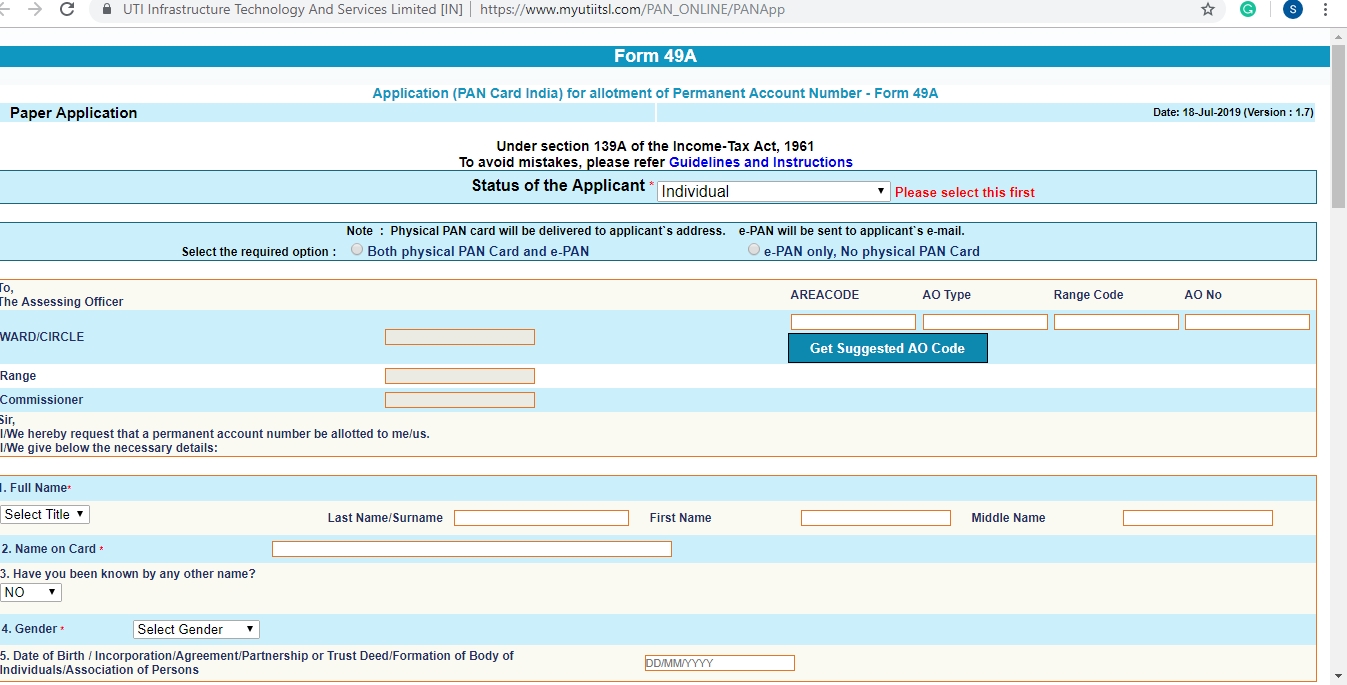
Step 3: Provide all the details exactly as per your Aadhaar Card. The Aadhaar number is verified by UTIITSL immediately. Check the acknowledgement box and click on submit. Also submitting Aadhaar as Id proof is mandatory.

Step 4: Once all the details have been entered, the process for application of e-PAN is initiated. After completion of the application, the applicant has to submit the same. To complete the application, the applicant must sign on a blank paper and scan it with the following specifications:
– Resolution: 200 DPI – Type: Color – File Type: JPEG – Size: 10 KB (Max) – Dimensions: 2 cm x 4.5 cm
Step 5: Post attaching the scanned copy, the electronic application is complete. You will receive a 15 digit acknowledgement number on your email ID or mobile number mentioned on your application. Once the e-PAN has been allotted, you will receive an alert by SMS or email.
Step 6: To check the status of your e-PAN application, follow the link and Check the Application Status by feeding in the application(coupon) number





Cleartax is a product by Defmacro Software Pvt. Ltd.

ISO 27001
Data Center

SSL Certified Site
128-bit encryption